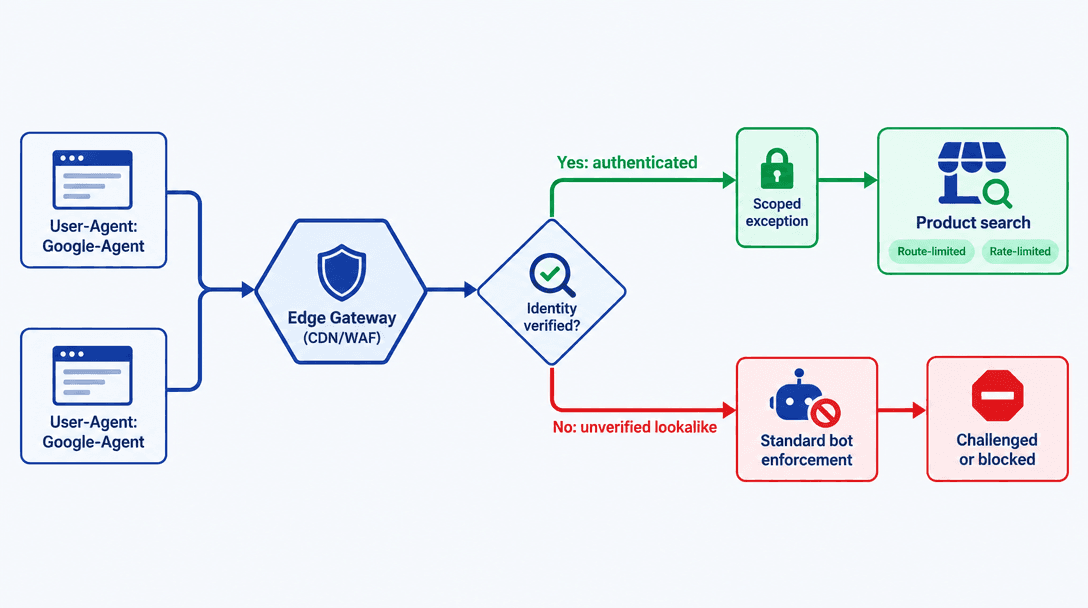
An AI agent visits your storefront, searches for a product, and gets blocked by a JavaScript security challenge. For the customer who initiated the request, this means an incomplete shopping journey. To allow Google-Agent and ChatGPT agents safely, first verify their identity and then create narrowly scoped exceptions for the security controls blocking legitimate tasks.
For platform engineers, security teams, and technical SEOs, the goal is controlled access, not a blanket bot bypass. Google and OpenAI verify their agents differently, so each one needs its own path. Once verified, both still sit behind route restrictions, application authorization, and abuse controls.
The order of work:
-
- Trace the blocked request.
-
- Verify the agent's identity.
-
- Create narrowly scoped CDN/WAF exceptions.
-
- Cover the complete journey and shared-egress traffic.
-
- Test legitimate access and hostile lookalikes.
Note: Before starting: you need Content delivery network (CDN) and web application firewall (WAF) access, security-event and origin logs, a staging environment or canary route, and a test account that can run transactions safely. Export the current rules, assign a rollback owner, and pull the latest provider documentation. You're done when approved tasks complete and authentication, authorization, fraud defenses, and exploit protections are all still enforced.
Step 1: Find the rule blocking Google-Agent
Start with a real agent task against a journey you control. Line up timestamps and request IDs across CDN events, WAF decisions, and origin logs. For each request, note the host, path, method, status, matched rule, challenge outcome, and verification result. Keep credentials, cookies, and sensitive request bodies out of what you capture.
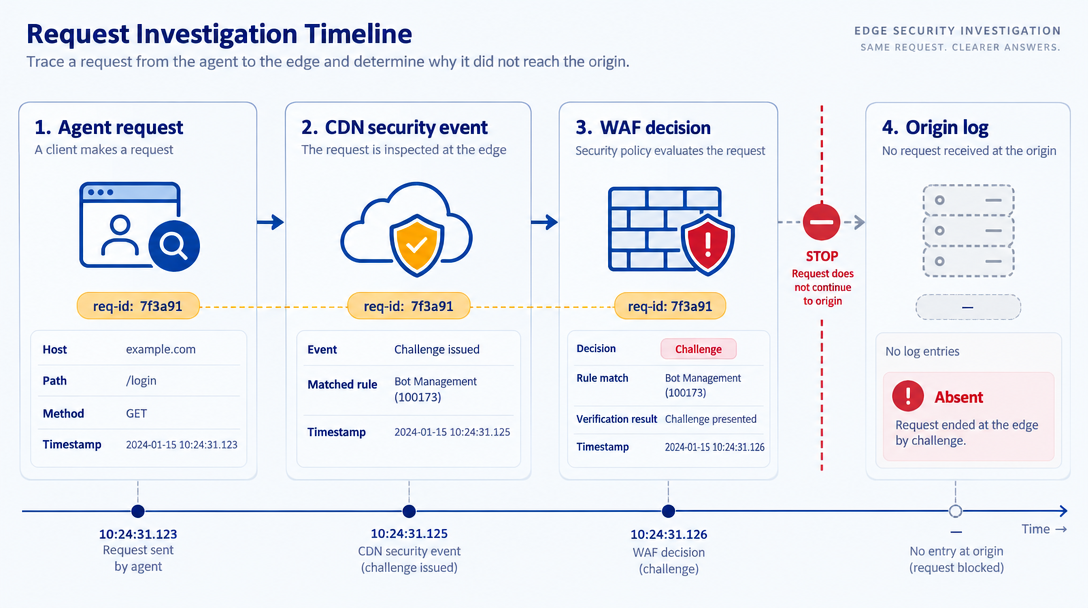
The usual suspects are Data centre network blocks based on Autonomous System Numbers (ASNs), AI-agent categories, JavaScript challenges, CAPTCHAs, and rate limits. A request stopped by a firewall rule might never show up in application logging at all. There's a quieter failure too: a 200 response whose body is challenge HTML. Status codes don't prove a page was reachable, so look at what the bot check actually served.
For user-triggered fetchers, robots.txt doesn't stand in for edge access policy, and editing it won't remove a CAPTCHA. Confirm how each fetcher behaves in Google's user-triggered fetcher documentation. When you review AI crawler categories, keep search, training, and interactive traffic distinct rather than treating them as one bucket.
Step 2: Verify AI agent requests before granting exceptions
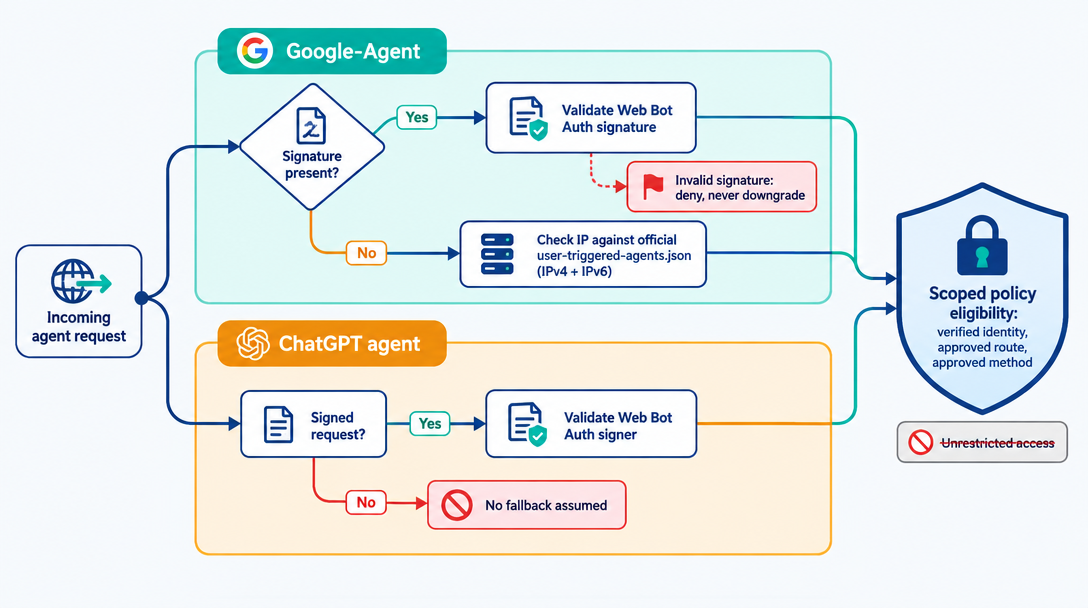
A Google-Agent user-agent string claims an identity but does not prove it. So is a signature-agent header. Neither tells you who actually sent the request. The table below sets out how each provider handles verification as a 2026 implementation reference; check the linked documentation before you deploy anything.
| Provider | Claimed identity signals | Cryptographic verification | Documented fallback | Exception eligibility |
|---|---|---|---|---|
| Google-Agent | User-agent or signature-agent presence alone is insufficient. | Web Bot Auth on some requests. | Official IP verification for unsigned requests. | Verified identity, approved route, and approved method only. |
| ChatGPT agent | User-agent or signature-agent presence alone is insufficient. | Documented signed-request model. | No Google-style IP fallback assumed. | Authenticated signer, approved route, and approved method only. |
Google: signatures plus the documented unsigned path
Follow Google's official instructions for allowing Google-Agent traffic. For manual verification, confirm that the user-agent identifies Google-Agent and that the request originates from an IP address listed in Google's official user-triggered-agents.json file.
Google is also experimenting with Web Bot Auth and currently signs only a subset of requests. When a signature is present, validate it according to Google's documented requirements. Requests with invalid signatures must not receive privileged access.
Pull the official ranges automatically, cover both IPv4 and IPv6, keep a last-known-good copy, and alert when an update fails. A missing signature and a failed signature are different events. When cryptographic verification fails, the request must never be quietly downgraded into trusted access. Keep an eye on Google's Web Bot Auth rollout as well as the provider docs.
ChatGPT agent: authenticate the signer
OpenAI uses Web Bot Auth to authenticate supported cloud browser requests. Follow OpenAI's agent-access documentation to verify these requests. This verification method is separate from the controls used for OpenAI's search and training crawlers. Validate the HTTP message signature, the documented identity, key discovery, covered components, and freshness requirements, or use a CDN verified-agent integration that supports this. The signature-agent header is something to authenticate, not a string to allowlist.
Then confirm the authenticated signer matches the agent identity OpenAI documents. Invalid, stale, or untrusted signatures get no privileged exception. Two mistakes to avoid: inventing an IP fallback that isn't documented, and stretching this signed-request model to cover every OpenAI crawler or product.
Step 3: Allow Google-Agent through narrowly scoped rules
Verified identity should buy relief from one thing: the bot control that's actually breaking the task. Here is the logical order. Map it onto your provider's execution phases afterward:
Policy evaluation order:
-
- Apply mandatory upstream network restrictions and any security controls that can never be exempted.
-
- Verify provider identity before the exception is evaluated.
-
- Match on verified identity, approved host, approved route, and permitted method.
-
- For matching requests, skip only the bot challenge or bot-category control identified in Step 1.
-
- Run everything else: exploit detection, applicable rate limits, authentication, authorization, fraud checks, and application validation.
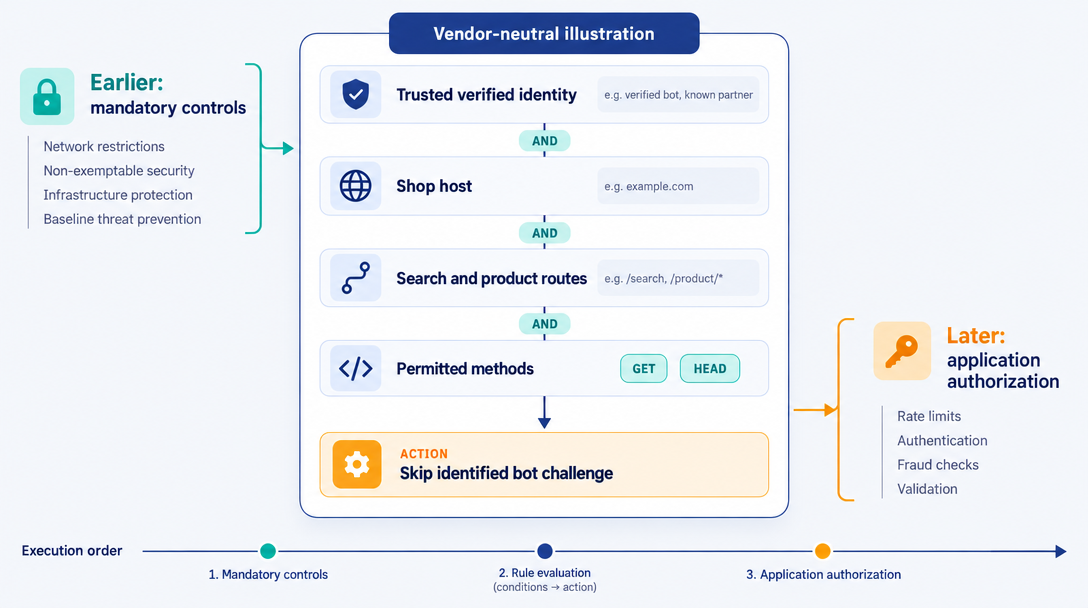
Warning: Ordering matters: the scoped exception has to run before the bot control it exempts. A terminating block earlier in the chain stops later rules from ever firing. If that earlier block is the one you need to relax, use its supported exception path. An allow rule placed after it does nothing.
Vendor-neutral pseudocode: IF trusted_verified_provider AND approved_host_route AND permitted_method THEN skip_identified_bot_challenge_only; ELSE existing_enforcement. Identity has to come from trusted edge verification or a server-controlled integration. A "verified" flag supplied by the client should never be accepted.
To allow ChatGPT agent traffic in Cloudflare, identify the verified agent and the security feature blocking its requests. Apply a narrowly scoped exception using the supported controls available on your plan. Standard Bot Fight Mode cannot be bypassed using WAF custom Skip rules, while Super Bot Fight Mode supports applicable exceptions. Keep all unrelated security protections active.
Step 4: Open the journey, not just the homepage
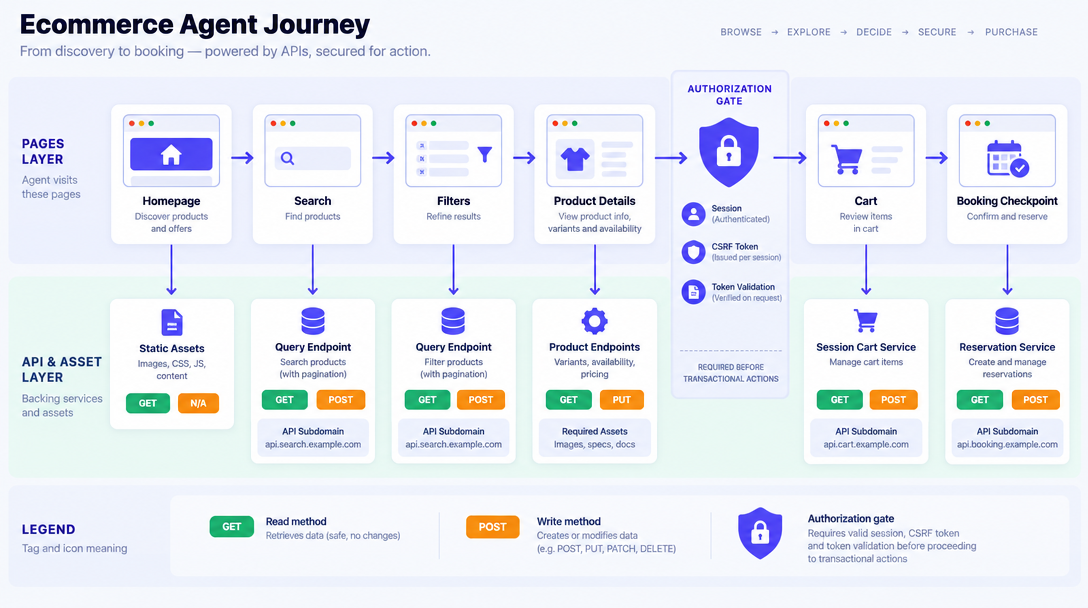
Inventory every route and method the task touches:
- Search and filters: query endpoints, pagination, and any API subdomains.
- Product pages: required assets, variants, availability, and pricing endpoints.
- Cart and booking: only the intended operations, still under normal sessions, authorization, Applicable cross-site request forgery (CSRF) protections, and validation.
Agent egress addresses are shared by many Google users, so a low per-IP threshold ends up throttling customers who have nothing to do with each other. Where your platform supports it, combine trusted account or session context with limits on endpoint cost, concurrency, and aggregate abuse. Arbitrary client identifiers should never become rate-limit keys.
Bot management for AI agents is about letting an approved task finish. It isn't permission to buy things or expose private inventory. Run write tests in a sandbox or a flow that can't complete a purchase, and audit the complete agent journey before widening coverage.
Step 5: Prove access and scraper resistance
Begin in staging or on a narrow canary. Save the original rules and set rollback thresholds before the exception goes live. Promotion to production depends on two results: legitimate tasks complete, and hostile lookalikes get no privileged treatment.
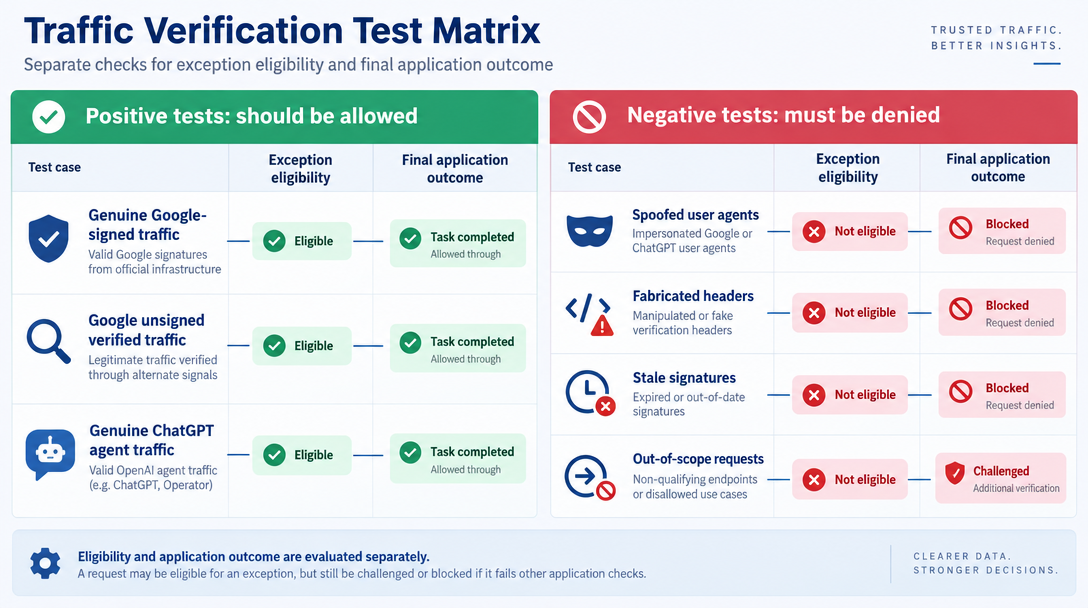
Run both classes of test:
- Positive: real Google-triggered tasks, Google's unsigned verification path where you can observe it, and a real signed ChatGPT agent journey that reaches an approved cart or booking checkpoint.
- Negative: spoofed user-agent strings, fabricated signature-agent headers, invalid or stale signatures, and out-of-scope routes or methods. None of these should inherit the exception.
Check the response body, the edge decision, and what happened at the origin. Sending a copied user-agent through curl tells you whether impersonation fails; it says nothing about whether genuine agents get in. Keep tests free of production side effects. Once live, watch task completion, challenge counts, 403 and 429 responses, signature failures, latency, unexpected writes, feed failures, and how much traffic the exception matches.
Keep a kill switch you can flip immediately. Re-test after provider updates and bot-rule changes, and plan for CDN migration failure modes. Rerun agent-readiness checks as well, but treat accessibility and visibility as separate questions: a successful fetch guarantees neither a citation nor a ranking.
Troubleshooting: where allowed agents still get blocked
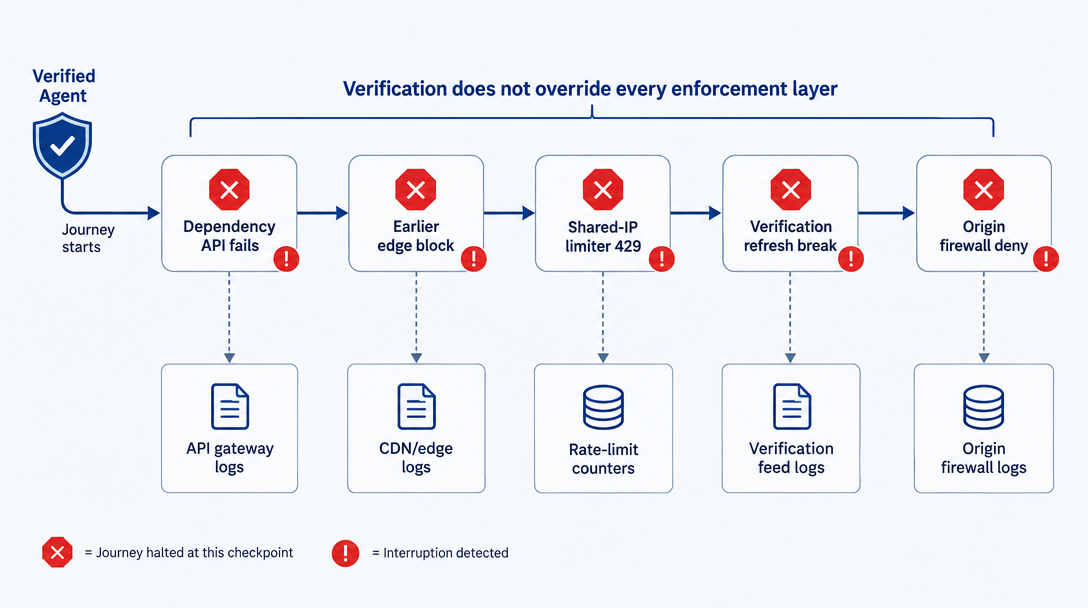
Six rollout failures and where to look:
- Homepage works, search fails: check API subdomains, dependencies, methods, and challenges that apply only to certain routes.
- Verified traffic still fails: find the terminating rule. It may sit in an upstream firewall, an origin ACL, or application middleware.
- Customers receive 429s: look at shared-egress limits and switch to session-aware, endpoint-cost controls where supported.
- Spoofed traffic passes: something still trusts the user-agent or header alone. Remove that trust and confirm the signer is actually being authenticated.
- Access breaks after refresh: check feed parsing, IPv6 coverage, key discovery, and cache behavior; roll back to the last-known-good configuration where appropriate.
- Verification fails behind a proxy: check whether the load balancer or proxy preserves the original client IP and the headers required for signature verification.
Frequently asked questions
Is Google-Agent the same as Googlebot?
No. Google-Agent handles agent activity that a user triggers; Googlebot crawls for Search. Verify them separately, give them separate access policies, and don't confuse either one with model-training access.
Does robots.txt block user-triggered Google-Agent requests?
Don't count on it to enforce anything for these documented user-triggered requests. Read Google's fetcher-specific behavior, then enforce access in your CDN, firewall, and application policy.
Is the Google-Agent user-agent string enough to verify a request?
No. Anyone can spoof it. Validate signatures where they're supported, or use Google's documented verification path for unsigned traffic. A request that fails its signature check must never quietly end up trusted.
Does ChatGPT agent use the same verification method as Google-Agent?
Not exactly. OpenAI documents signed agent requests. Google signs only some of its requests and documents a separate way to verify unsigned ones. Either way, a valid signature tells you who the agent is, not whether the user is allowed to take a given action.
Can I allow ChatGPT agent in Cloudflare without disabling bot protection?
Yes, provided your account and the blocking product support the exception you need. Match the authenticated agent identity and approved routes, exempt only the control that's doing the blocking, and leave the rest of your security checks in place.
How Vizup Helps You Turn Agent Accessibility Into Organic Visibility
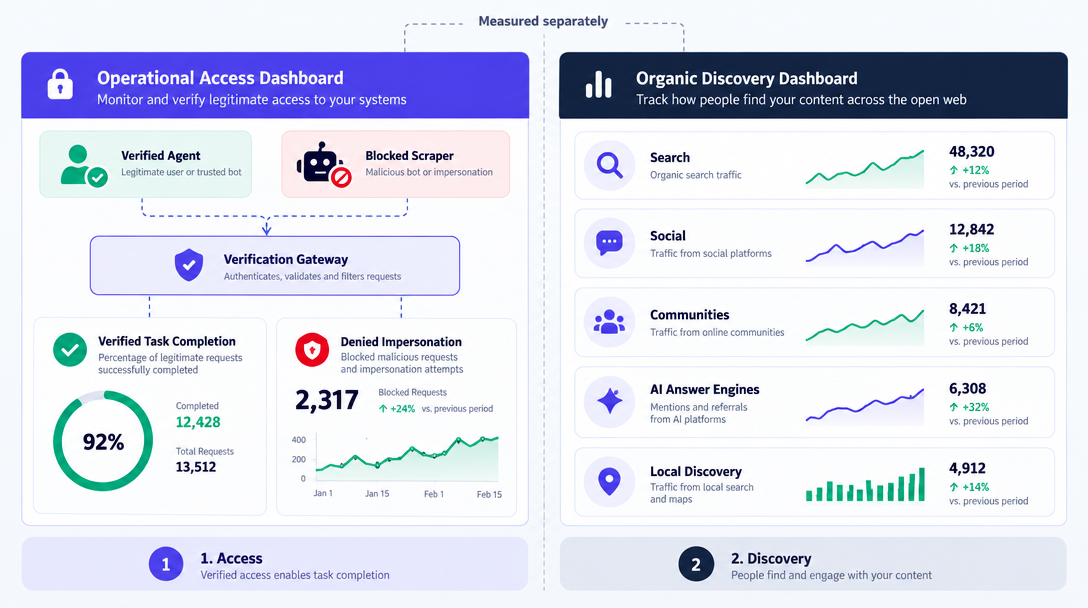
Allowing verified AI agents is an important first step, but website accessibility alone does not guarantee visibility, citations, or recommendations. Brands also need to understand where they appear across modern discovery channels and where improvements are needed.
Vizup is an Organic Autopilot for modern discovery, helping brands monitor, create, optimise, publish, and learn across Search, Social, Communities, AI Answer Engines, and Local Discovery using AI agents, human experts, and live SEO, pSEO, AEO, and GEO tools. Paid ads are available as an optional amplification add-on.
While your security infrastructure manages agent access, Vizup helps turn organic visibility insights into actionable improvements.
Explore Vizup to monitor and improve your brand's organic visibility across modern discovery channels.
