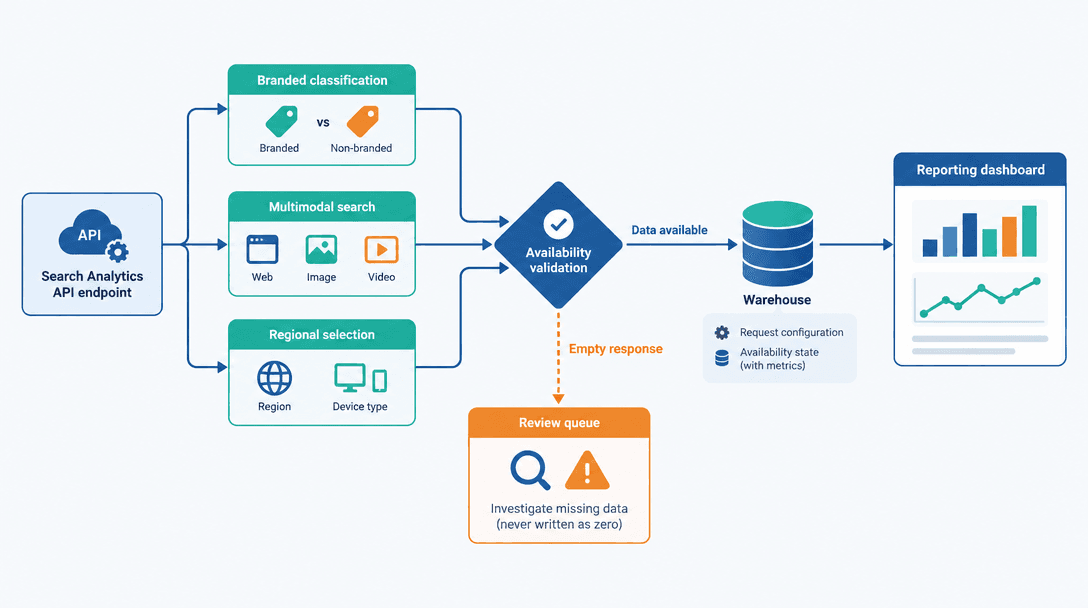
A request can succeed and still contain zero branded rows. If your pipeline writes that empty response as a zero, the dashboard will show a collapse in brand demand that never happened. Pulling search console api branded queries is only half the job. The other half is checking whether the data was available in the first place.
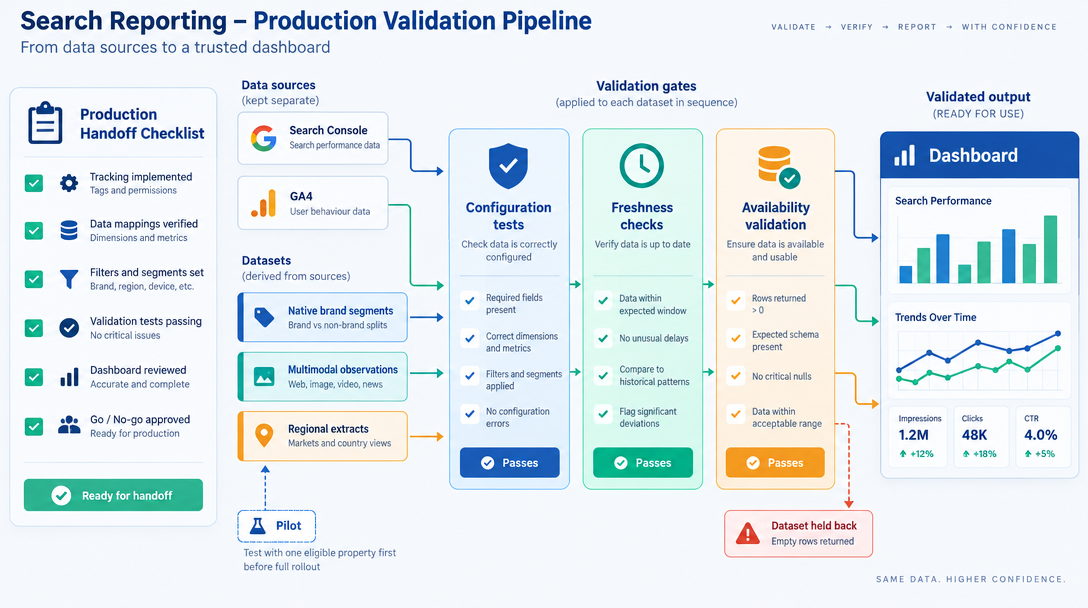
If you're retiring a regex list you've been maintaining by hand, the production pipeline produces three related outputs: native brand segments, multimodal traffic identified in its own lane, and regional extracts you can reuse across reports. Store each one's request configuration and availability state right next to the metrics.
Extraction workflow:
-
- Save an unfiltered baseline.
-
- Pull branded and non-branded results as a pair.
-
- Extract multimodal search on its own.
-
- Apply reusable country and device selections.
-
- Check availability before any metric reaches a dashboard.
Step 1: Establish access and save an unfiltered baseline
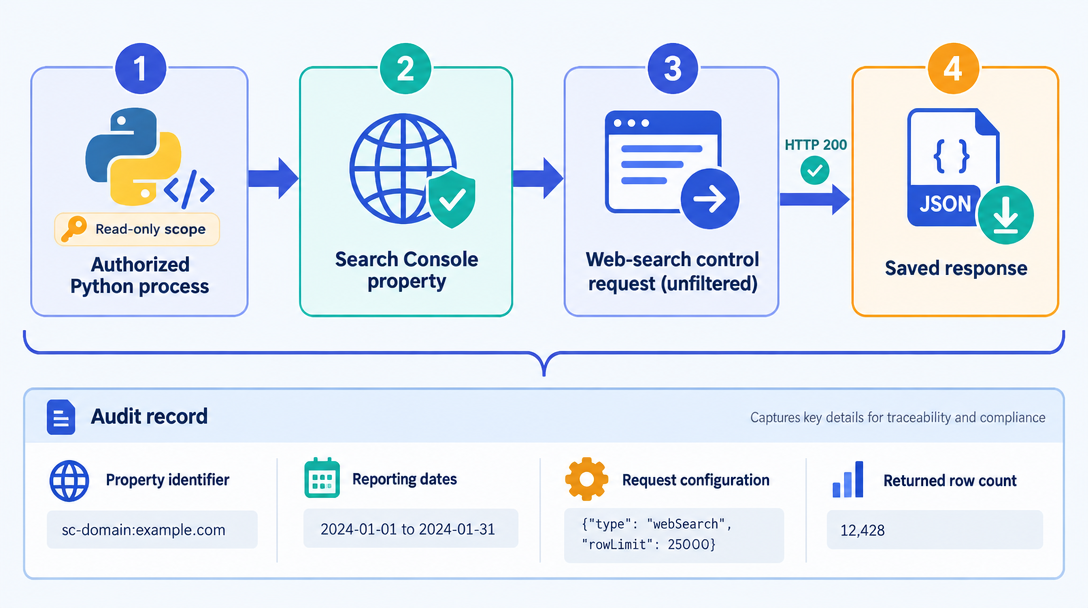
Enable the Search Console API in your cloud project, install google-api-python-client and google-auth, and authorize the webmasters.readonly scope. The authenticated user needs access to the property, and a service account has to be granted access explicitly. Get the property identifier exactly right: a domain property is sc-domain:example.com, while a URL-prefix property includes its scheme and registered prefix.
Pick complete dates that start on or after February 21, 2026, which the supplied rollout material gives as the branded-data boundary. Then confirm the property shows ordinary search activity for that window, and check whether the branded queries filter in Search Console is available for it at all.
The Search Console API Python baseline below authenticates with Application Default Credentials. Set credentials up in the environment, outside the script, and never embed secrets in code.
import json import google.auth from googleapiclient.discovery import build
SCOPES = ['https://www.googleapis.com/auth/webmasters.readonly'] credentials, _ = google.auth.default(scopes=SCOPES) service = build('searchconsole', 'v1', credentials=credentials) SITE = 'sc-domain:example.com' BASE = { 'startDate': '2026-11-01', 'endDate': '2026-11-07', 'type': 'web', 'dimensions': ['date'], 'aggregationType': 'byProperty', 'dataState': 'final', 'rowLimit': 25000 } request = service.searchanalytics.query(siteUrl=SITE, body=BASE) response, raw = request.http.request( request.uri, method=request.method, body=request.body, headers=request.headers ) if int(response.status)!= 200: raise RuntimeError((response.status, raw)) payload = json.loads(raw) print({'http_status': int(response.status), 'row_count': len(payload.get('rows', []))}) with open('baseline.json', 'w') as handle: json.dump({'site': SITE, 'request': BASE, 'response': payload}, handle, indent=2)
Executing the request raw means the script sees the actual HTTP status instead of assuming success. Cross-check each request field against Google's Search Console API reference. If you'd rather investigate conversationally, the Search Console and Claude MCP workflow is a separate, optional route; nothing in this pipeline depends on MCP.
Step 2: Extract Search Console API branded queries
Native classification takes over the tedious part of a regex list: brand names, misspellings, product-name patterns. What it can't take over is your organization's own definition of brand. When stakeholders need different inclusion rules from Google's, keep the custom regex segment running alongside it as a separate series.
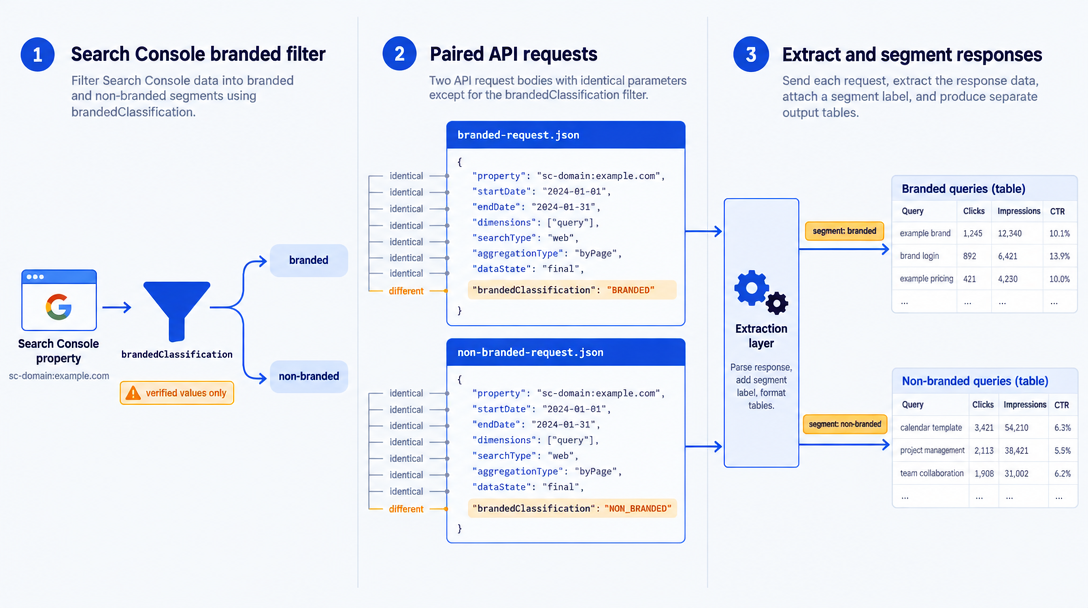
Get the exact operator and expression values for the brandedClassification filter from Google's November 2026 Search Analytics API announcement. Two traps to avoid: assuming a filter name doubles as a supported grouping dimension, and plugging in guessed values such as brand and nonbrand.
Save two complete, verified request bodies as branded-request.json and non-branded-request.json. Each keeps BASE's dates, dimensions, search type, aggregation and final-data setting, and the classification predicate is the only thing that differs between them. The extractor below reads those files, so it never has to assert a wire format nobody has verified.
from copy import deepcopy from datetime import datetime, timezone
def extract(body, segment): config = deepcopy(body) config.pop('startRow', None) config['rowLimit'] = 25000 rows, offset = [], 0 while True: page_body = {**config, 'startRow': offset} result = service.searchanalytics.query( siteUrl=SITE, body=page_body ).execute page = result.get('rows', []) rows.extend({**row, 'segment': segment, 'search_type': config.get('type', 'web')} for row in page) if len(page) < config['rowLimit']: break offset += len(page) return { 'rows': rows, 'metadata': { 'site': SITE, 'segment': segment, 'request': config, 'checked_at': datetime.now(timezone.utc).isoformat, 'outcome': 'rows_present' if rows else 'empty' } }
outputs = {} for segment in ('branded', 'non-branded'): with open(f'{segment}-request.json') as handle: outputs[segment] = extract(json.load(handle), segment)
Warning: The Search Console API row limit is up to 25,000 rows per request, and that number is not a promise of completeness. Google's established guidance describes top-row limitations and a daily ceiling of 50,000 rows per property and search type. Recheck the current limits before you schedule anything. Query-level exports also leave out anonymized queries.
Dashboard totals need their own aggregate requests; rebuilding them from a truncated query table gets them wrong. Keep clicks, impressions, ctr and position exactly as returned. CTR and average position don't add up across rows, so summing them produces nonsense.
Step 3: Add multimodal search as a separate extraction
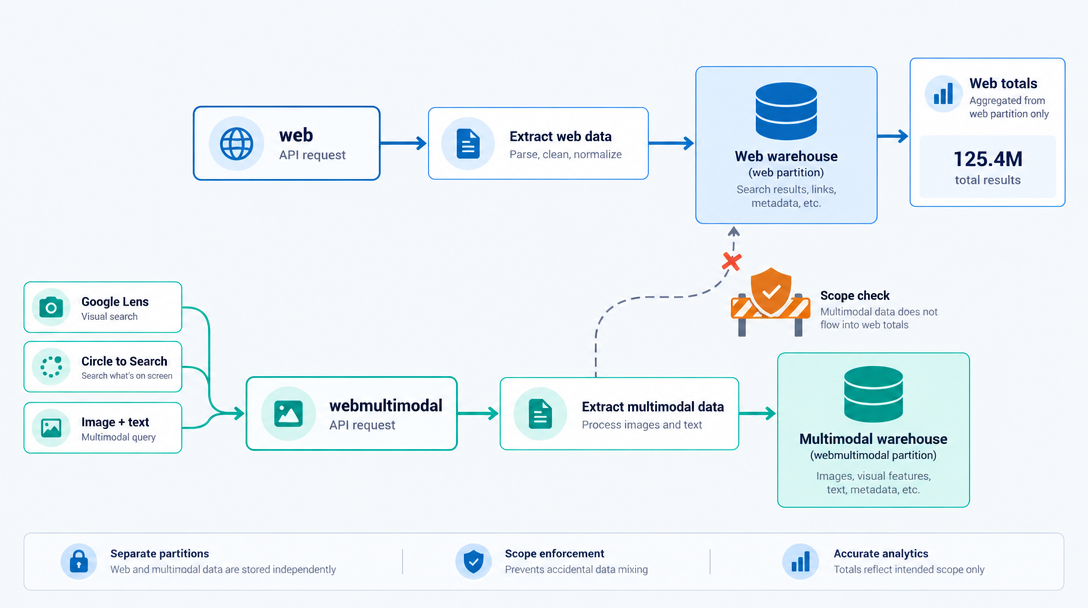
For the announced webmultimodal search type, the request change is a single field:
multimodal_request = {**BASE, 'type': 'webmultimodal'} multimodal = extract(multimodal_request, 'unfiltered')
The supplied announcement describes coverage involving Google Lens, Circle to Search and image-plus-text searches. That falls short of saying every interaction in those products is included. When you report Google Lens data in Search Console, or Circle to Search Search Console figures, keep the claim scoped to the documented dataset.
Don't fold these numbers into web totals until you've confirmed whether the two overlap, and don't assume brandedClassification works with this search type. The same caution applies downstream. For Search Console BigQuery multimodal ingestion, the fact that the API returns this data says nothing about bulk export. Check the current export documentation, and until support is confirmed, plan a separate table fed from the API. The multimodal reporting explainer covers the surrounding context.
Step 4: Reuse market selections without losing country detail
The filterLists Search Console API addition is meant for grouped selections, but its request nesting and supported operators still need verifying. Don't translate it into a generic OR expression on assumption, and don't guess whether the field sits inside a filter, a filter group or the request itself.
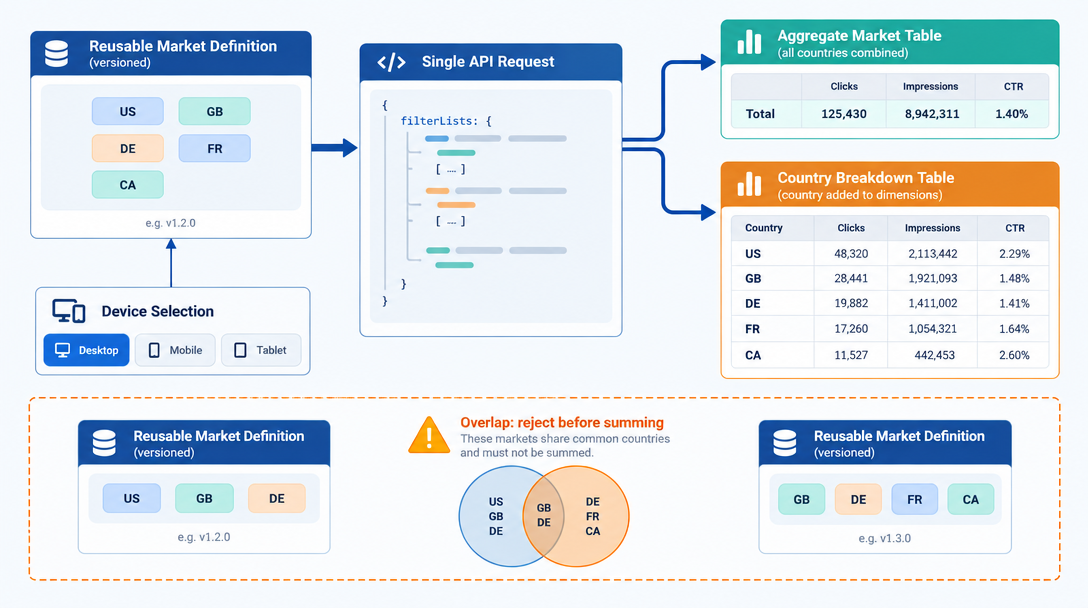
Before you build a Search Console API multiple countries extract, pin down three things: the country-code conventions, the accepted device values, and how conditions combine within a list versus between groups. Save the complete validated request as a versioned market configuration. Hand-assembled JSON built on undocumented guesses is how pipelines break.
A selection filters the data; it doesn't break it out. If the report needs separate rows per market, add country to dimensions. Keep agency market definitions and date windows consistent, and reject overlapping market definitions before any extracts get summed. The multi-country market grouping walkthrough shows the reporting pattern.
Step 5: Diagnose empty results before publishing
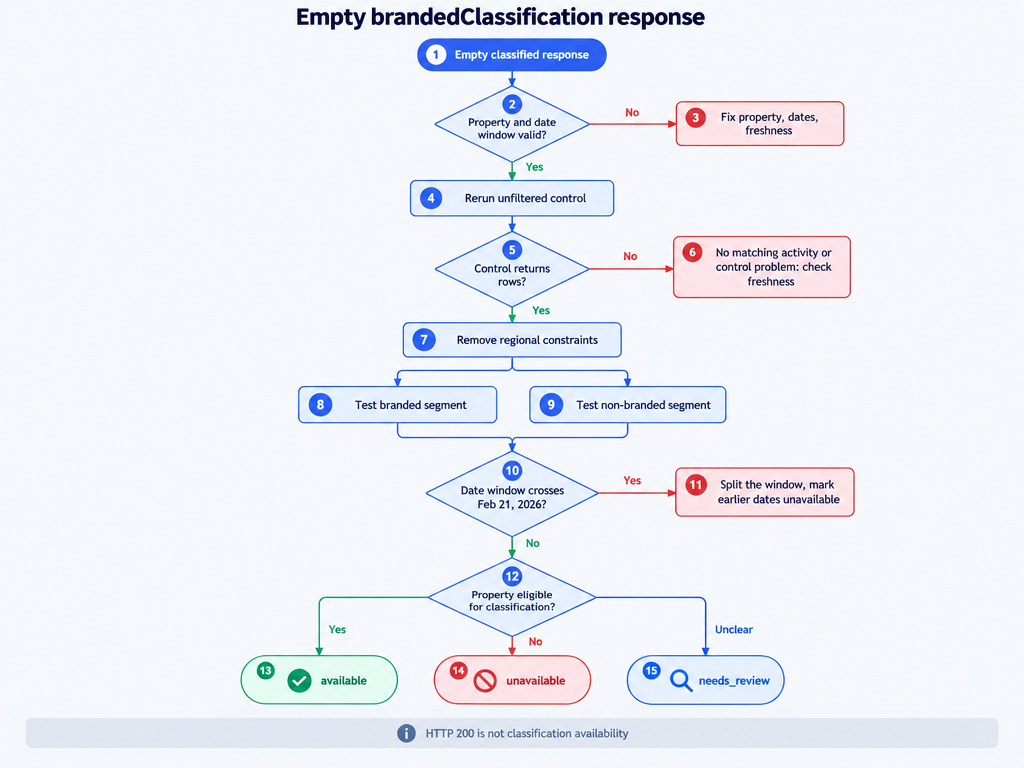
| Unfiltered control | Classified result | Date window | Likely interpretation | Next action |
|---|---|---|---|---|
| Rows present | Rows present | Valid | Classification returned data | Confirm settings, then publish |
| Rows present | Empty | Valid | Availability, eligibility, or an overly restrictive selection | Remove filters; test each segment |
| Empty | Empty | Valid | No matching activity, or a problem with the control | Check property, dates, and freshness |
| Any result | Empty or partial | Before or crossing February 21, 2026 | Branded data not supported for that period | Split the window; mark earlier dates unavailable |
| An empty classified response, by itself, is not evidence of zero branded demand. |
Work through it in order. Check the property and dates, rerun the control, strip out regional restrictions, then test branded and non-branded independently. Eligibility comes last. A property that isn't eligible can return no rows and no error, and that is an availability problem, not a measurement of zero.
For teams monitoring organic visibility with Vizup, these checks help keep Search Console reporting evidence separate from actual changes in brand demand. Validated data provides a more reliable starting point for finding visibility gaps and deciding what to improve next.
Attach the February 21, 2026 boundary to the dataset itself. A year-over-year comparison that crosses it is unavailable or inconsistent, and it is not evidence of sudden growth. Google's 2025 branded-filter announcement gives the eligibility rules and context on the AI-based classification. Spot-check a set of representative terms against it and record any disagreements in a separate field.
Classifying Google Search queries is also a different exercise from branded versus non-branded AI-query reporting. The labels look alike, but they are not equivalent measurements, so keep them unmerged.
Step 6: Test the reporting contract and ship
Common mistakes that survive a successful request
Run through these before you schedule the job:
- Comparisons are invalid when search types or aggregation settings don't match.
- Query rows won't necessarily reconcile with totals, because of privacy omissions and top-row limits.
- A rejected new field points to the request or the discovery schema, not to eligibility. Refresh the client schema and read the HTTP error.
- Regional extracts that overlap can't be summed as if they were disjoint markets.
- Recent dates that aren't complete yet look exactly like a demand drop. Use complete windows or record freshness explicitly.
General Search Console anomaly investigation is a separate job from checking classification availability, so keep the two apart. On the presentation side, GA4's native dashboard layer is a related reporting topic, but it sits beside Search Console data rather than replacing it.
Frequently asked questions
Can the Search Console API split branded and non-branded queries without regex?
Yes, for eligible properties: the announced native brandedClassification filter handles the split. If your business definition of brand differs from Google's classification, keep your custom regex segment as a separate series.
Why does a brandedClassification request return no rows even when the API call succeeds?
The property may be ineligible, the dates may be unsupported, the filters may be too restrictive, or there may simply be no matching data. Run an unfiltered control and compare before you assign an availability state.
How far back does branded query data go in the Search Console API?
The supplied rollout material puts the start at February 21, 2026. Any earlier branded period should be marked unavailable, never reported as zero.
Can I export Google Lens and Circle to Search data to BigQuery?
Yes. Google confirms that web multimodal search data is available in BigQuery for properties with active Search Console bulk data export.
You can also retrieve this data through the Search Analytics API using the webMultimodal search type and load it into your own reporting tables.
Keep the search type clearly labelled so multimodal results are not confused with standard web search metrics.
Does setting rowLimit to 25,000 return every Search Console query?
No. rowLimit sets the page size. Paginating through every page still leaves top-row limits, daily extraction ceilings and privacy-related omissions in place.
Turn Validated Search Data Into Organic Growth With Vizup
Getting branded and non-branded Search Console data is only the first step. The real value comes from understanding what the numbers mean and acting on reliable insights.
Start by validating branded classification for one eligible property. Check empty responses, confirm data availability, and keep multimodal and regional reporting clearly separated.
Vizup is an Organic Autopilot for modern discovery. It helps brands monitor visibility, create and optimise content, publish improvements, and learn across Search, Social, Communities, AI Answer Engines, and Local Discovery using AI agents, human experts, and live SEO, pSEO, AEO and GEO tools. Paid ads are available as an optional amplification add-on.
Use validated search data to inform your organic growth decisions. Explore Vizup to connect visibility intelligence with ongoing optimisation.
