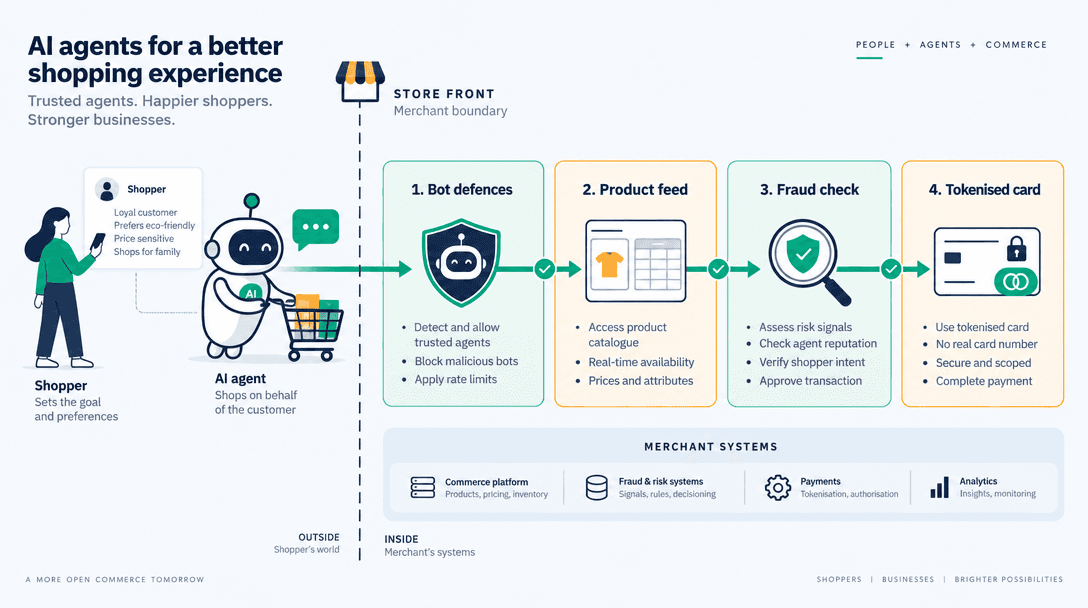
ChatGPT Wallet lets an agent take a shopper's order through payment. Your bot rules, fraud models and product feeds may stop it first. For growth, payments, fraud and site-ops leads, the job is to make that purchase possible without weakening security. Start with access and product data, then tackle checkout.
Work through these six steps in order:
- Size the opportunity against current ChatGPT Wallet availability.
- Let signed ChatGPT agent requests through your bot defences.
- Clean up your ChatGPT Business Hub product feed.
- Brief fraud and payments on agent checkout payment tokens.
- Remove checkout friction an agent cannot get past.
- Run a test purchase and monitor declines.
The audience is small today. But a blocked agent won't complain to customer service. It can simply take the order elsewhere, leaving you to find the failure in your logs.
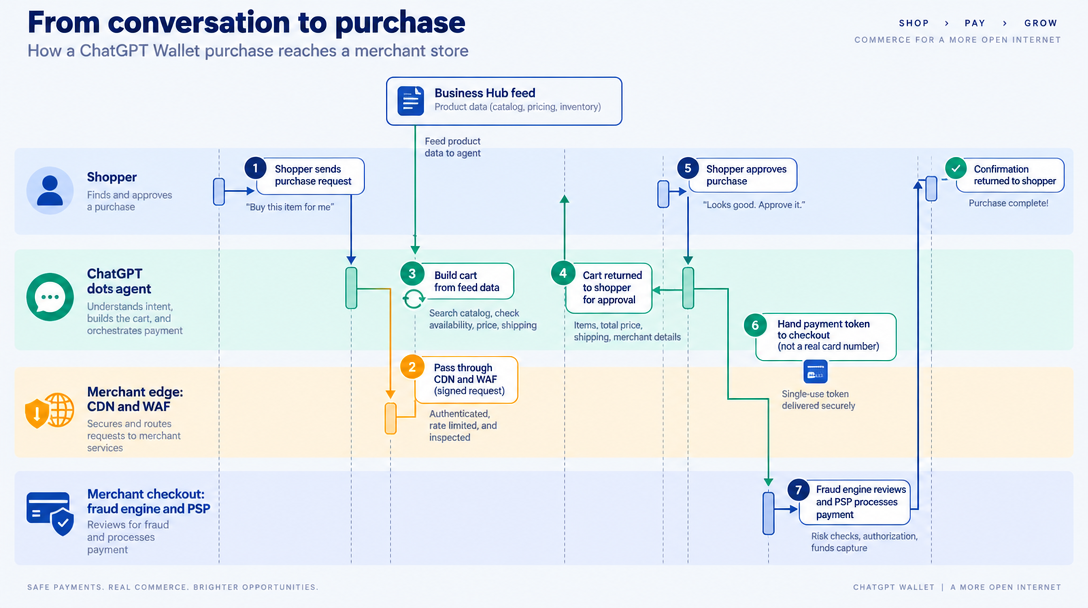
How a ChatGPT Wallet purchase actually reaches your store
A shopper asks the ChatGPT dots agent to find and buy something, then approves the cart it builds from product data. Payment uses a token rather than the real card number, as PPC Land's 2025 coverage of the launch explains. The order, pricing and customer relationship remain yours.
Responsibility crosses teams: the CDN and WAF control access, feeds and pages handle discovery, and the fraud engine and payment service provider (PSP) handle payment. No single team controls the whole purchase.
| Human shopper | Unsigned scraper | Signed ChatGPT agent | |
|---|---|---|---|
| Bot defences, default response | Pass, occasional CAPTCHA | Challenge or block | Often blocked like a scraper |
| Fraud engine sees | Mouse movement, residential IP, history | Fast requests, datacenter IP | Instant cart building, datacenter IP, no mouse |
| Product data source | Your site pages | Your site pages | Business Hub feed plus site |
| Payment credential | Card | None | Agent payment token |
| Merchant action | Standard flow | Keep blocking | Verify signature, allow, review orders |
| Your defences can mistake a signed buyer for an unsigned scraper. |
What you need before you start
Get admin access to your CDN or bot-management tool, such as Cloudflare, Akamai or DataDome, and your ChatGPT Business Hub account. Line up contacts at your fraud vendor and PSP. You'll also need server or edge logs filterable by request headers.
Read OpenAI's commerce documentation and agent-access page before changing anything. They take precedence over a blog post, including this one. Vizup's AI agent friendliness audit offers a quick baseline for checking your site.
Step 1: Decide how much ChatGPT Wallet readiness is worth right now
At launch, ChatGPT Wallet is available to eligible US ChatGPT Pro subscribers aged 18 or older using dots with eligible US-issued cards. Near-term order volume will be small. These are early users of agent-led shopping, but their purchasing behaviour and potential order volume are not yet established, but a business case built on volume that doesn't exist yet won't survive scrutiny.
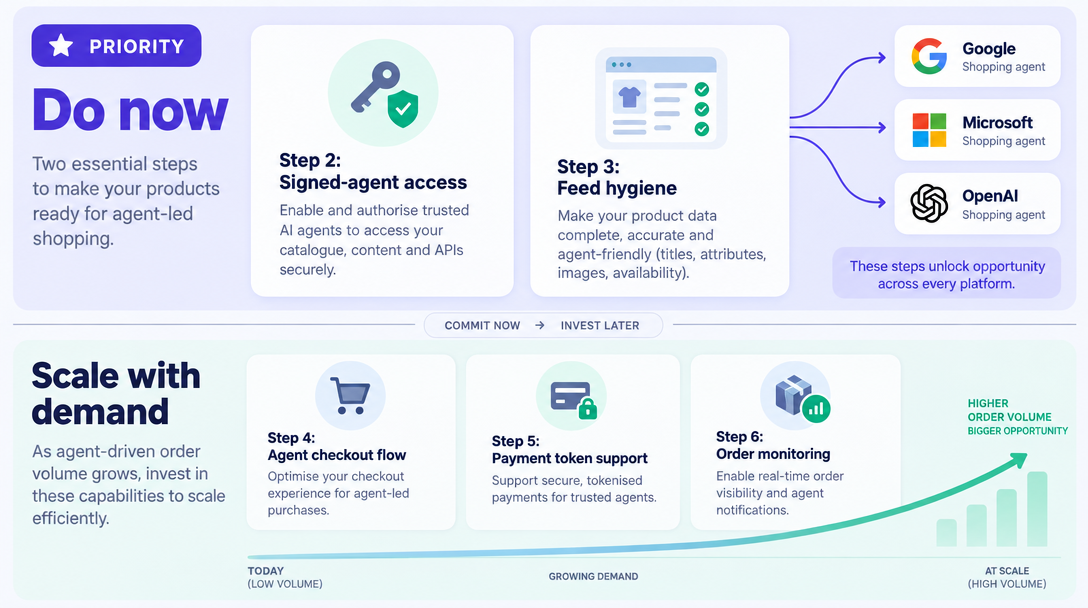
Fund steps 2 and 3 now: access and feed improvements also serve other agents and answer engines. Scale steps 4 to 6 with demand.
Step 2: Let signed ChatGPT agent requests through your bot defences
Anti-scraper rules, JavaScript challenges and CAPTCHAs can reject a paying agent just like a price scraper. Don't disable them; verify the visitor. Web Bot Auth lets agents cryptographically sign requests, giving you something stronger than a claimed identity. For comparisons, see Vizup's posts on Google testing Web Bot Auth and Google's agent-allow firewall settings.
Find where agents are getting stopped today
Start in the logs:
- Filter for HTTP message signature headers: Signature, Signature-Input and Signature-Agent. Find requests returning 403, 429 or a challenge page.
- Check CDN bot scores, WAF custom rules, cart and checkout rate limits, and geo-blocking separately.
- Follow the full purchase path. Passing the homepage says nothing about access to /cart.
Allow verified signatures, not user-agent strings
Enable your vendor's Web Bot Auth or signed-agent verification and add OpenAI's ChatGPT agent as a verified bot. Without vendor support, verify signatures yourself. Check OpenAI's agent-access docs for authoritative header names and key locations before writing the rule.
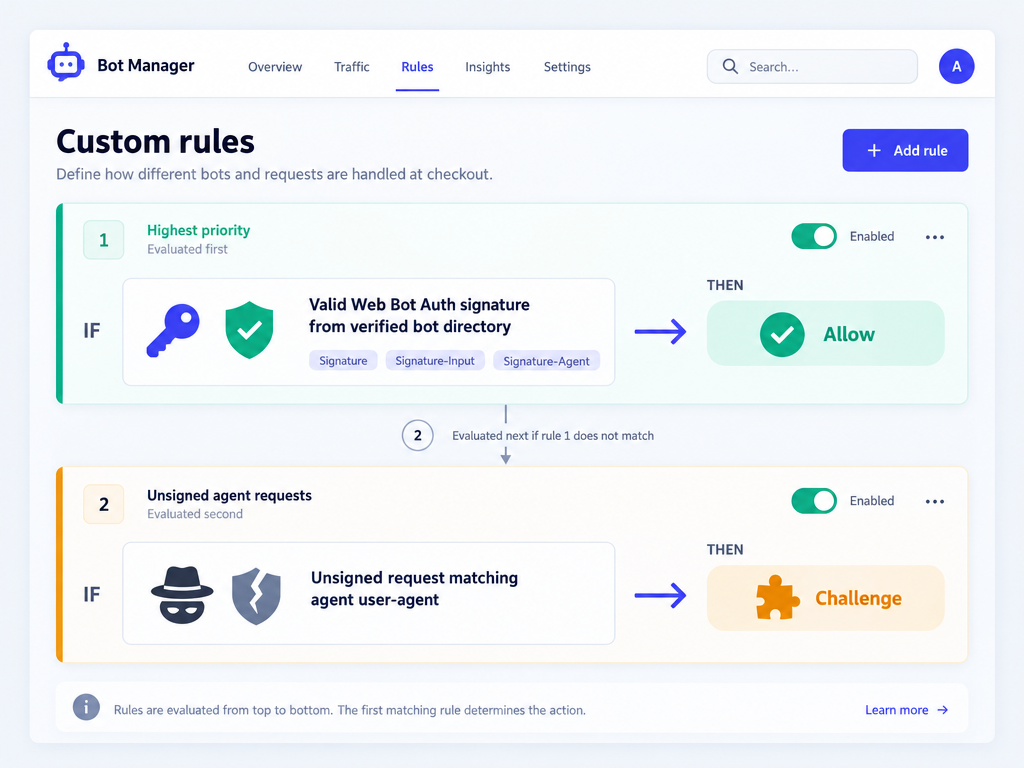
Warning: Never allow-list a user-agent string alone. Anyone can spoof it, including the scrapers your rules are meant to stop.
Step 3: Treat your ChatGPT Business Hub product feed as the storefront
ChatGPT can use Business Hub product feeds alongside other retail and public web sources to discover products. Agents can also browse merchant websites without a product feed or plugin. An outdated price or false 'in stock' flag can cost a sale, not just a click. Use Vizup's ChatGPT Business Hub guide for setup, then assign a feed owner.
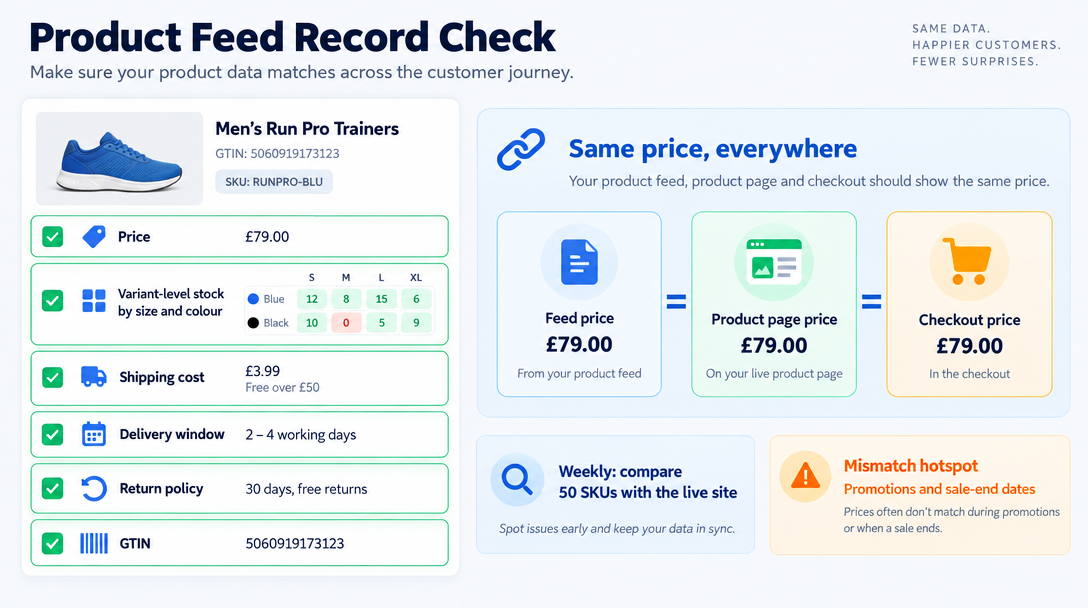
Check these fields and update rules:
- Refresh frequency that keeps pace with price changes.
- Stock by size and colour, not just parent SKU.
- Shipping cost and delivery windows.
- Return policy.
- GTINs for every product that has one.
Tip: Each week, compare 50 SKUs in the feed with the live site. Look closely at promotions and sale-end dates, where mismatches cluster.
Step 4: Brief fraud and payments before the first agent order lands
No mouse movement, instant cart building, datacenter IPs: legitimate agent sessions resemble traffic fraud models reject. Brief your fraud team before orders arrive, rather than waiting for a decline or dispute to expose the problem.
Ask your PSP how agent payment tokens appear in authorisation data and whether they carry a network-level indicator. They replace the cardholder's real card number; don't assume they behave like standard wallet tokens.
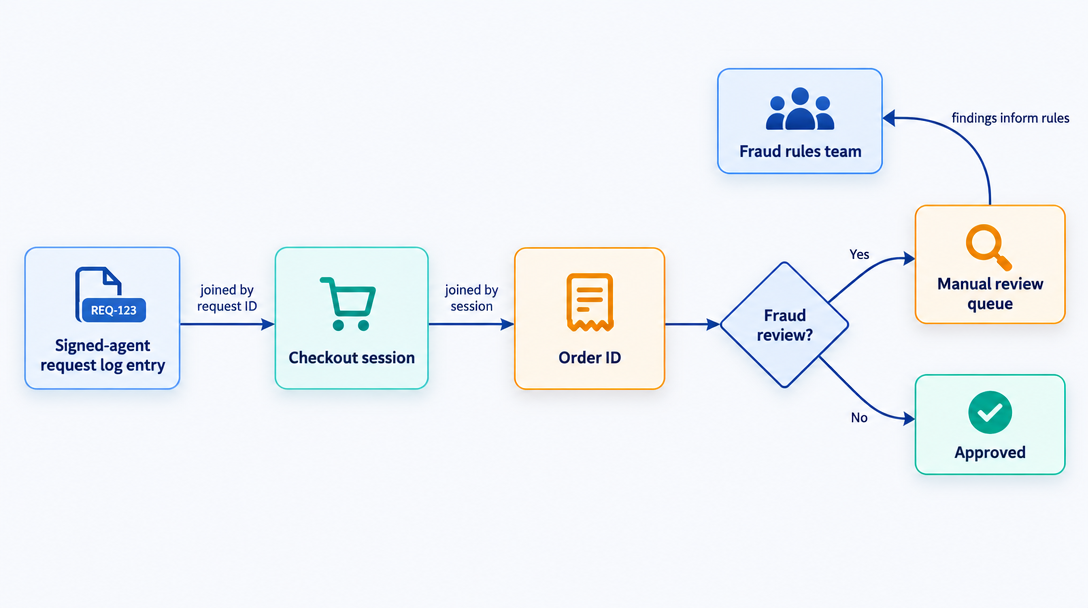
Note: OpenAI has not named a transaction flag that identifies Wallet purchases. Where request or session identifiers are available, correlate verified-agent traffic with checkout sessions and order IDs. Add merchant-side logging where necessary, and confirm available transaction indicators with your payment provider. Review those orders manually before changing fraud rules.
Step 5: Remove the checkout friction an agent can't negotiate
Review forced account creation, newsletter interstitials, CAPTCHA challenges and cookie banners that may interrupt checkout. Offer guest checkout where appropriate, while retaining legally required age checks, customer authentication and fraud controls. Test whether a verified agent can complete the permitted steps without bypassing security requirements. Human conversion can benefit too, giving budget holders another reason to fund the work.
Step 6: Run a test purchase, then keep watching
If an eligible teammate has ChatGPT Wallet access, a qualifying US Pro account and an eligible US-issued card, run a controlled low-cost test purchase through dots. Trace the purchase through CDN logs, the fraud decision, PSP authorisation and your order system. A staging test won't expose every break in that chain.
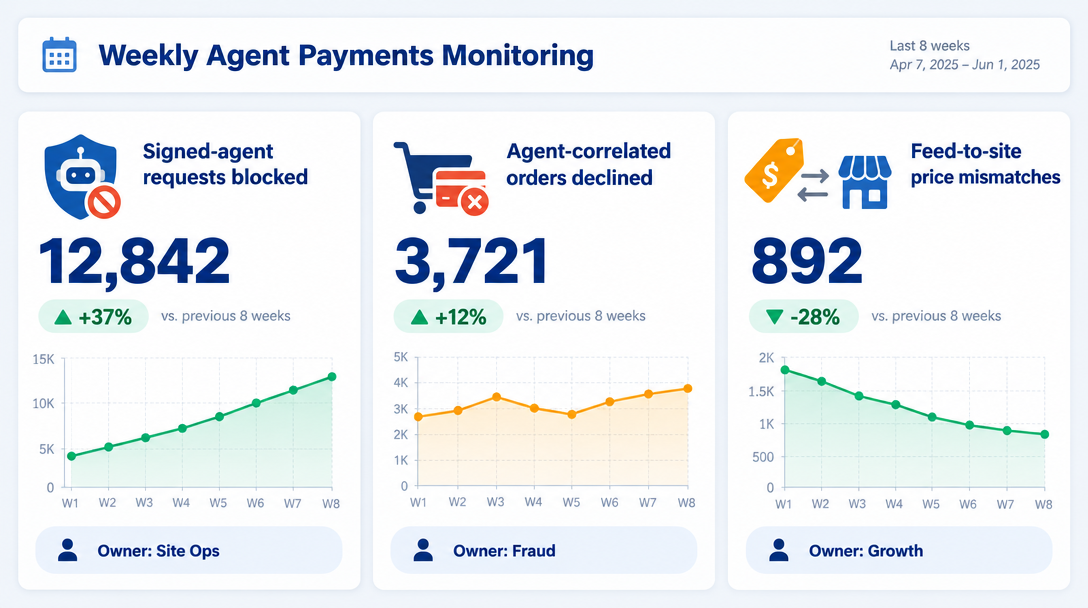
Review three numbers weekly: blocked signed-agent requests, declined agent-correlated orders and feed-to-site price mismatches. Vizup's Answer Engine Monitoring shows how products appear in ChatGPT answers before checkout, helping distinguish a discovery problem from a purchase failure.
Where ChatGPT Wallet readiness usually goes wrong
Watch for four mistakes:
- Allow-listing by user-agent or IP range. Verify signatures instead of giving scrapers another way in.
- Fixing the CDN but missing checkout API rate limits. Browsing works; payment fails.
- Writing blanket 'allow agent' fraud rules without data. Correlate orders before loosening controls.
- Uploading the feed once and walking away. It needs ongoing maintenance and a named owner.
Your next move to sell through ChatGPT agents
Assign owners this week, starting with signed access and feed accuracy. Both investments serve platforms beyond ChatGPT Wallet. Use Vizup to monitor your brand and products across AI answer engines while checkout work follows demand. For the discovery work, start with how AI agents find your website.
Frequently asked questions
Do I need a new payment gateway or plugin for ChatGPT Wallet?
Check OpenAI's commerce documentation for your integration requirements, then ask your PSP how it handles agent payment tokens. Don't buy a plugin unless the documentation or your PSP says you need one.
Who can use ChatGPT Wallet, and when will access expand?
At launch, access is limited to US ChatGPT Pro subscribers aged 18 or older using dots. No published expansion timeline is cited here. Plan around that limit and recheck OpenAI's announcement for changes.
Does OpenAI charge merchants for ChatGPT Wallet payments?
OpenAI's published commerce guidance does not specify a separate ChatGPT Wallet merchant fee. Confirm applicable processing costs and commercial terms with your payment provider before calculating margins. Check OpenAI's commerce docs and your PSP agreement before calculating margins. Treat unsourced fee figures as unconfirmed.
Who handles refunds, returns and chargebacks for agent purchases?
You still own the order and customer relationship, so your normal refund and return policies apply. The sources reviewed don't specify dispute rules for agent payment tokens. Confirm those with your PSP and OpenAI's docs before assuming chargeback workflows stay unchanged.
How do I identify orders placed by a ChatGPT agent?
OpenAI has not named a Wallet transaction flag. Match signed-agent request IDs in edge logs to order IDs and review the orders manually. Check the agent-access page for any new identification method.
